Licensed

Message Gateway

SMS, email and payment requests from Nova and Aptic, with every delivery tracked.

Message Gateway — The dashboard

SMS, email, payment requests and two-way SMS conversations

Booked from Nova workflow actions or the Aptic e-message queue — no change to the collection system

Delivery reports, bounces, payments and replies written back to the case

Event handlers — a delivery status or a reply triggers the next step

Sending windows by weekday and hour, aware of bank holidays

Test recipients and a simulator make a test system safe against live data

A delivery service between your collection system and the channels debtors actually read. It picks up the messages Nova or Aptic decide to send, renders them from case data, sends them through your SMS, email or payment provider, and writes what happened back on the case — so a failed send is a visible event rather than a silent one.

Collection platforms are good at deciding that a message should go out and poor at telling you what happened next. When a reminder does not arrive, the question is always the same: was it sent, was it accepted by the provider, and was it delivered? Message Gateway answers all three, and puts the answer on the case where the handler will see it.

How a message travels

  1. Nova or Aptic books it. In Nova, a message is an ordinary workflow action, so action trees and case handlers book SMS and email the way they book anything else. In Aptic it is the e-message queue and action items. Operators can also send a message by hand from the web interface, or park it as a draft for someone else to approve.
  2. The gateway renders it. A message profile holds the template, the recipient rule, the provider and the sending window. Fields and formulas are filled from case and debtor data read through your own data-source definitions, so a template can say remaining principal plus half the interest without anyone writing code.
  3. A provider delivers it. Email over SMTP; SMS through LinkMobility, Vonage, Spirius or SMSTeknik; payment requests through Swish, Strålfors, MobilePeople, LinkMobility Mobile Invoice or your own payment-link service; operational alerts to a Microsoft Teams channel.
  4. What happened comes back. Delivery reports and payment callbacks arrive through a Svalefelt-hosted callback endpoint — no inbound port on your side — or by polling. Replies by SMS and by email are fetched and matched to the case; bounced email is analysed rather than ignored. The result is written as a history note in Nova or Aptic, and every message keeps its full status history in the gateway.

Rules an operator can set

  • Sending windows. Which weekdays and hours a profile may send, with bank holidays taken from the collection system's own calendar. A message generated outside the window waits.
  • Valid time. How long the gateway keeps trying before it gives up and marks the message failed.
  • Retries. A provider or mail-server hiccup reschedules the message; a message in the provider's hands is never sent twice.
  • Priority profiles jump the queue when a notice cannot wait.
  • Recipient rules. Debtor, customer, creditor, an estate or bankruptcy administrator, a fixed address, or a custom recipient resolved by a query of your own.

Event handlers

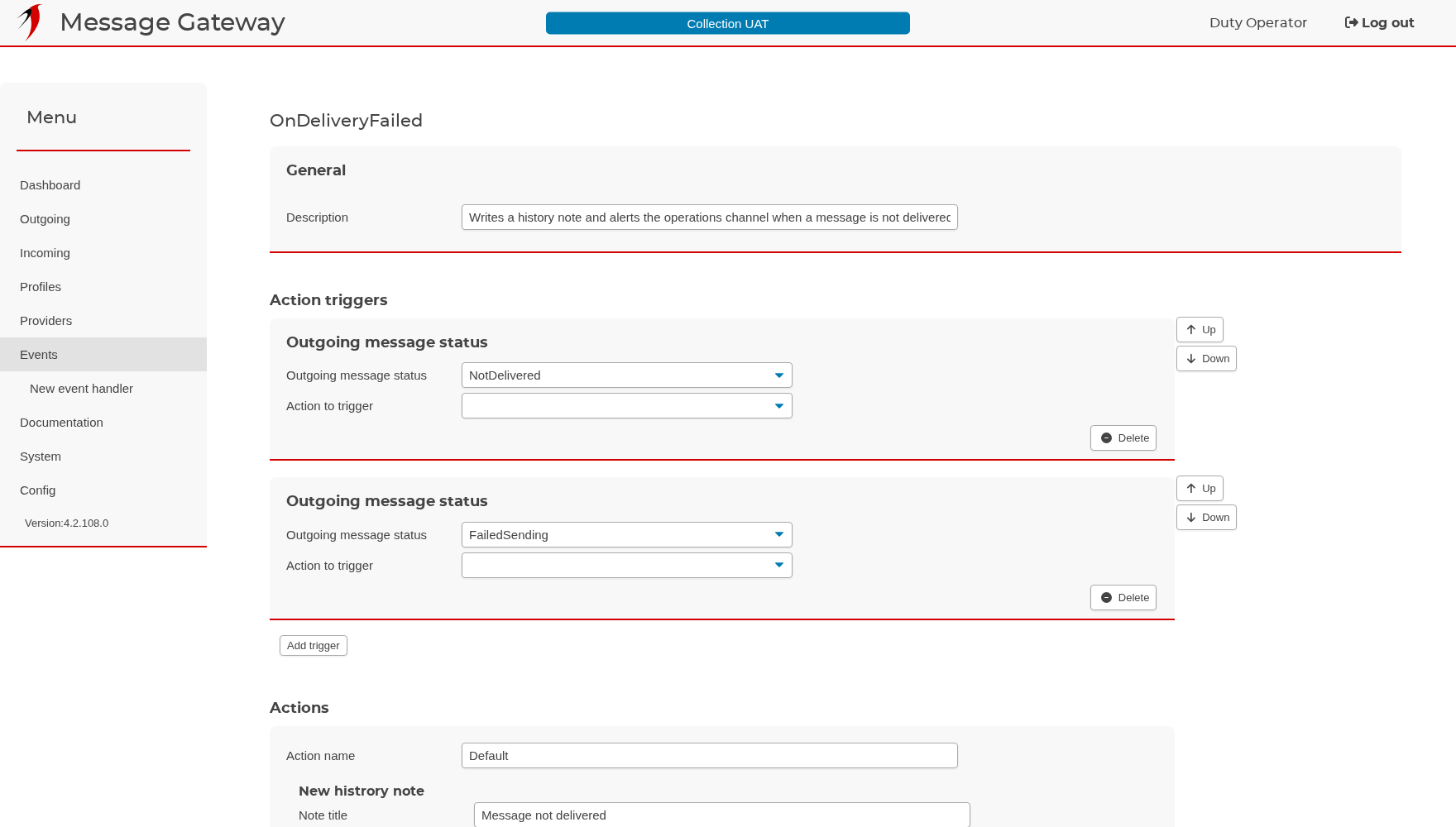
An event handler is what happens after a message leaves. A trigger fires on a delivery status, on a reply that matches a text, or on an action registered in the source system; the actions that follow can write a history note, send another message, run a query or call a web service. That is how not delivered becomes a note on the case and an alert in the operations channel, and how STOP from a debtor becomes a flag rather than a message nobody read.

Safe to test against live data

A provider can be limited to a list of test recipients, so a test system connected to a copy of production can only ever reach a few known addresses. The simulator provider keeps messages on the machine and lets you play the provider — delivered, failed, bad address, paid — and the rest of the system reacts exactly as it would to a real one. The profile tester renders a profile against a real case and shows who it would have gone to, without sending anything.

Built to be operated

The web interface shows what the gateway is doing right now: the dashboard counts messages at every stage and per profile, the outgoing and incoming lists filter by state, and every case and every recipient has a page with its whole correspondence. Any background process — receiving, matching, sending, recalling, status refresh, synchronisation — can be paused on its own during maintenance and resumed a second later, without restarting the service. Logs are readable in the browser, the system page shows fifteen-minute performance metrics, and an optional admin API exposes health, Prometheus metrics and job control to your monitoring.

One service instance serves one collection system; several instances run side by side on one server when you serve more than one company. The service runs on Windows, Linux or Docker, talks to the broker over TLS, and writes an append-only log of everything it did.

Message Gateway is in daily use at collection agencies across the Nordics.

Message Gateway in pictures

11 screens, and what each one does.

The dashboard

The dashboard

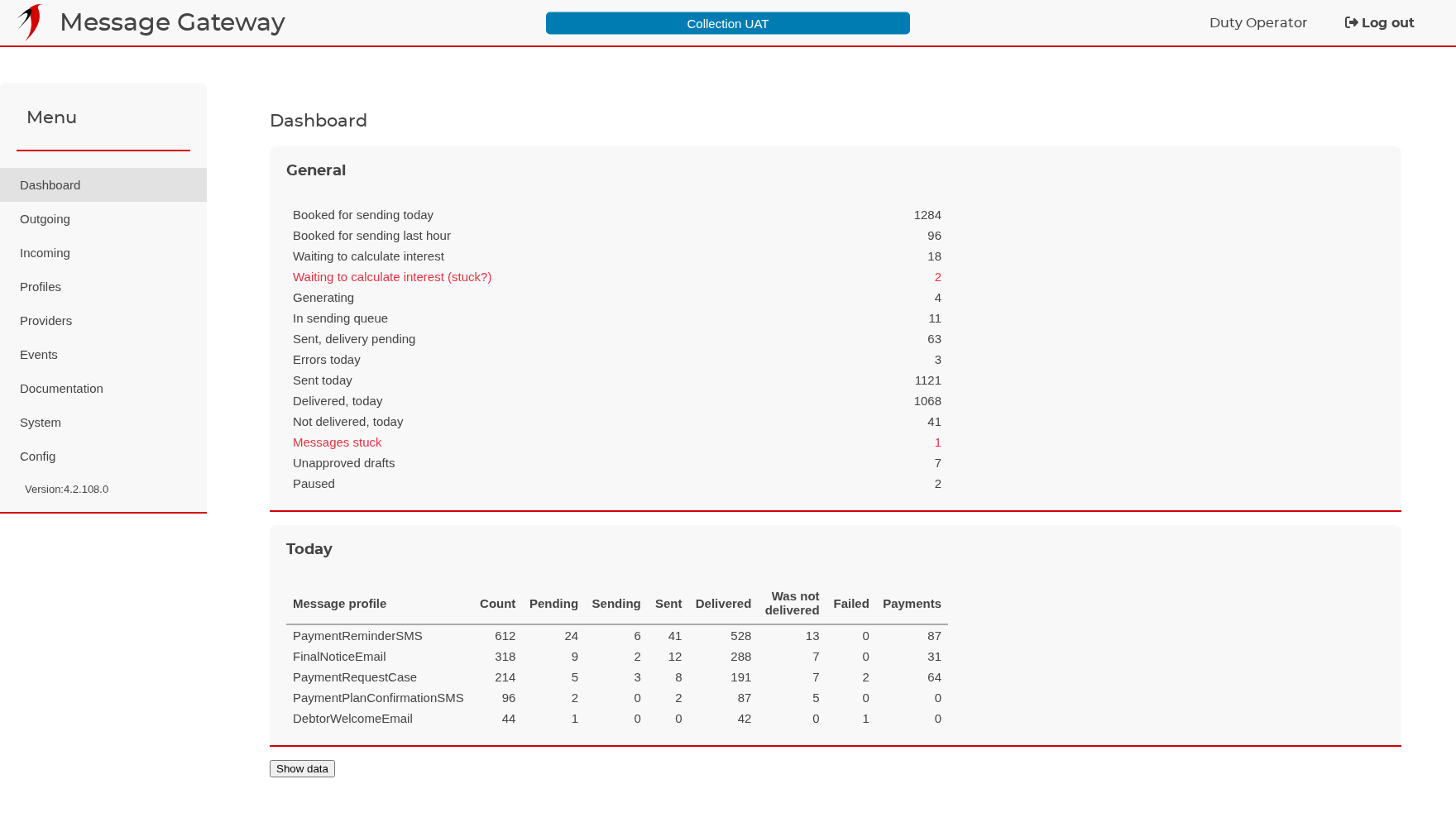
Is the gateway keeping up? The answer in two boxes.

The General box counts the messages that are on their way: booked for sending today, waiting for an interest calculation, being generated, queued, and sent but not yet confirmed. Rows that only appear when something needs attention — stuck messages, unapproved drafts, paused messages — are the ones to watch. The Today box breaks the same day down per message profile, so you can see which profile produced the traffic and how much of it was paid. The page refreshes itself every ten seconds.

Outgoing messages

Outgoing messages

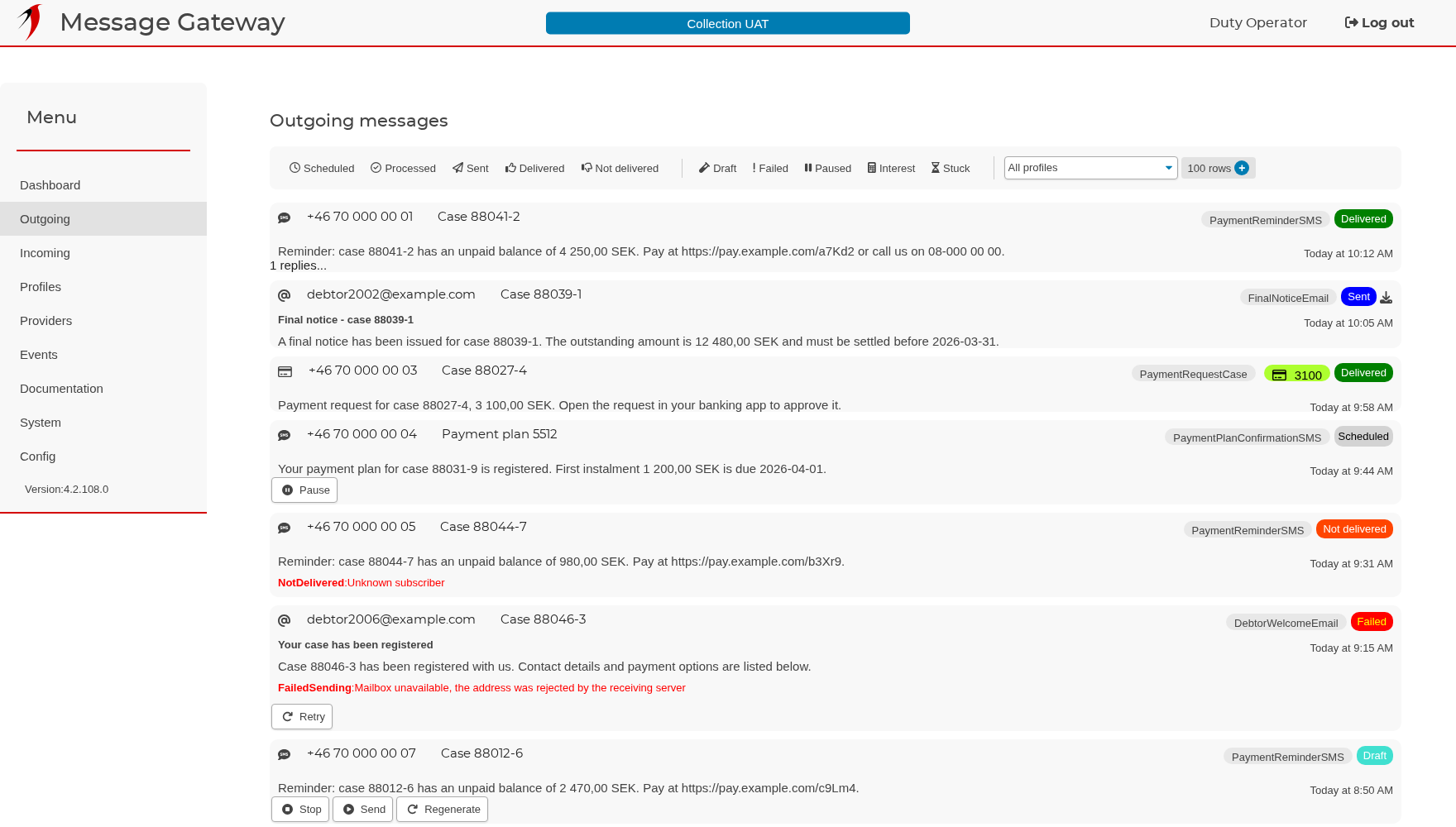
Every message the gateway has produced, newest first, filtered by state.

The filter bar picks one state at a time: scheduled, sent, delivered, not delivered, draft, failed, paused, stuck. Each card shows the recipient, the case, the profile that produced it, the finished text and a coloured pill with the state. When a filter allows bulk work — drafts, for instance — a row of buttons appears to send, delete, regenerate or pause everything in the current filter at once.

A single message

A single message

The provider's own words when something went wrong.

The card is the unit the whole list is built from. When a send fails, the provider's wording is printed in red — usually the fastest way to tell a wrong number from a rejected mailbox. The buttons change with the state: a failed message can be retried, a draft sent or deleted, and a message already in the provider's hands can be recalled.

Incoming messages

Incoming messages

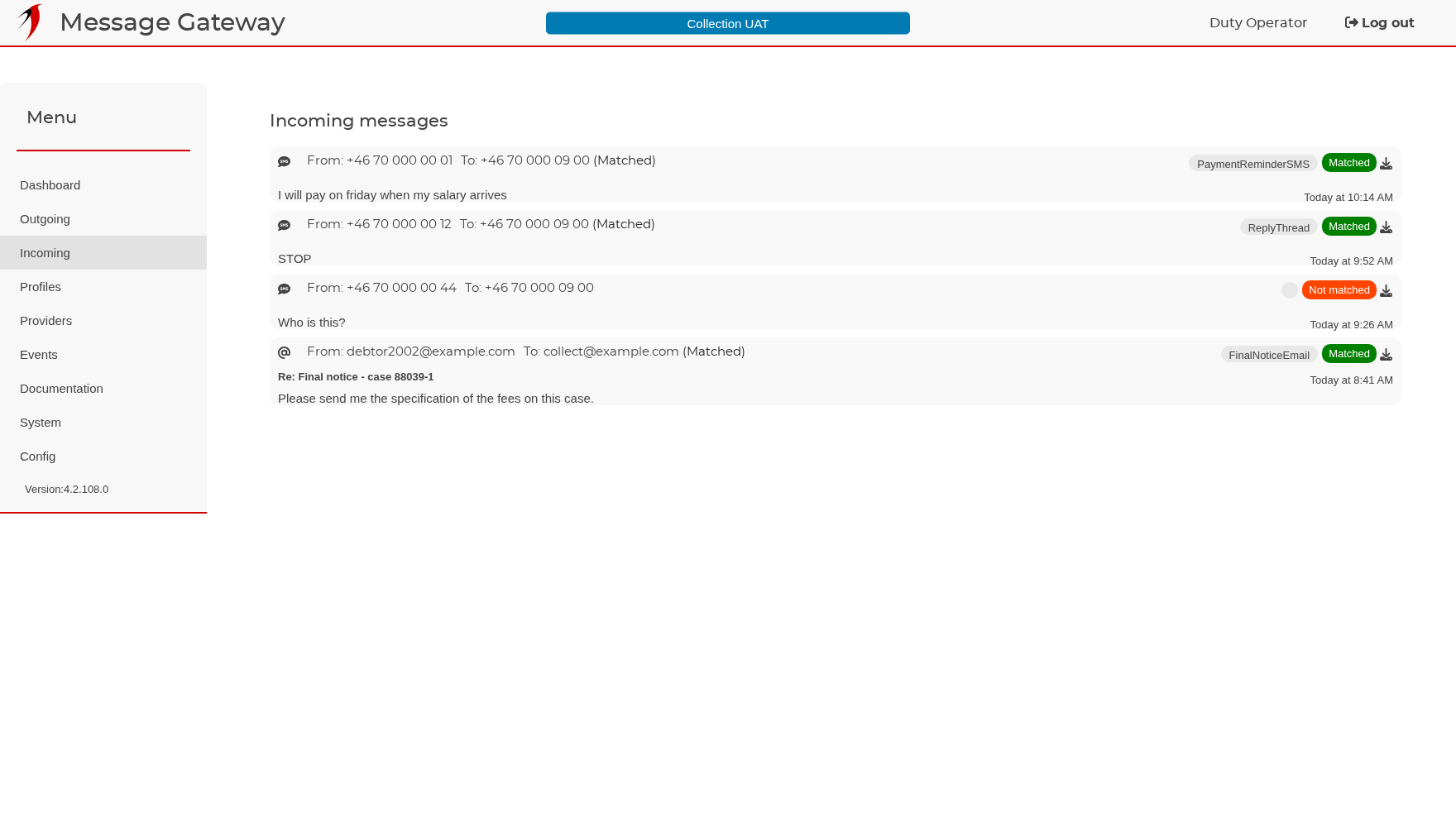
Replies, matched to their case or flagged for a person.

Replies arrive here whether they came as an SMS answer to a reminder or as an email to the shared inbox. Matched means the message was attached to the case and any event handler for replies has run. Not matched means nobody could be identified from the sender, and somebody has to look — normally the small part of the page that needs a person.

All messages on one case

All messages on one case

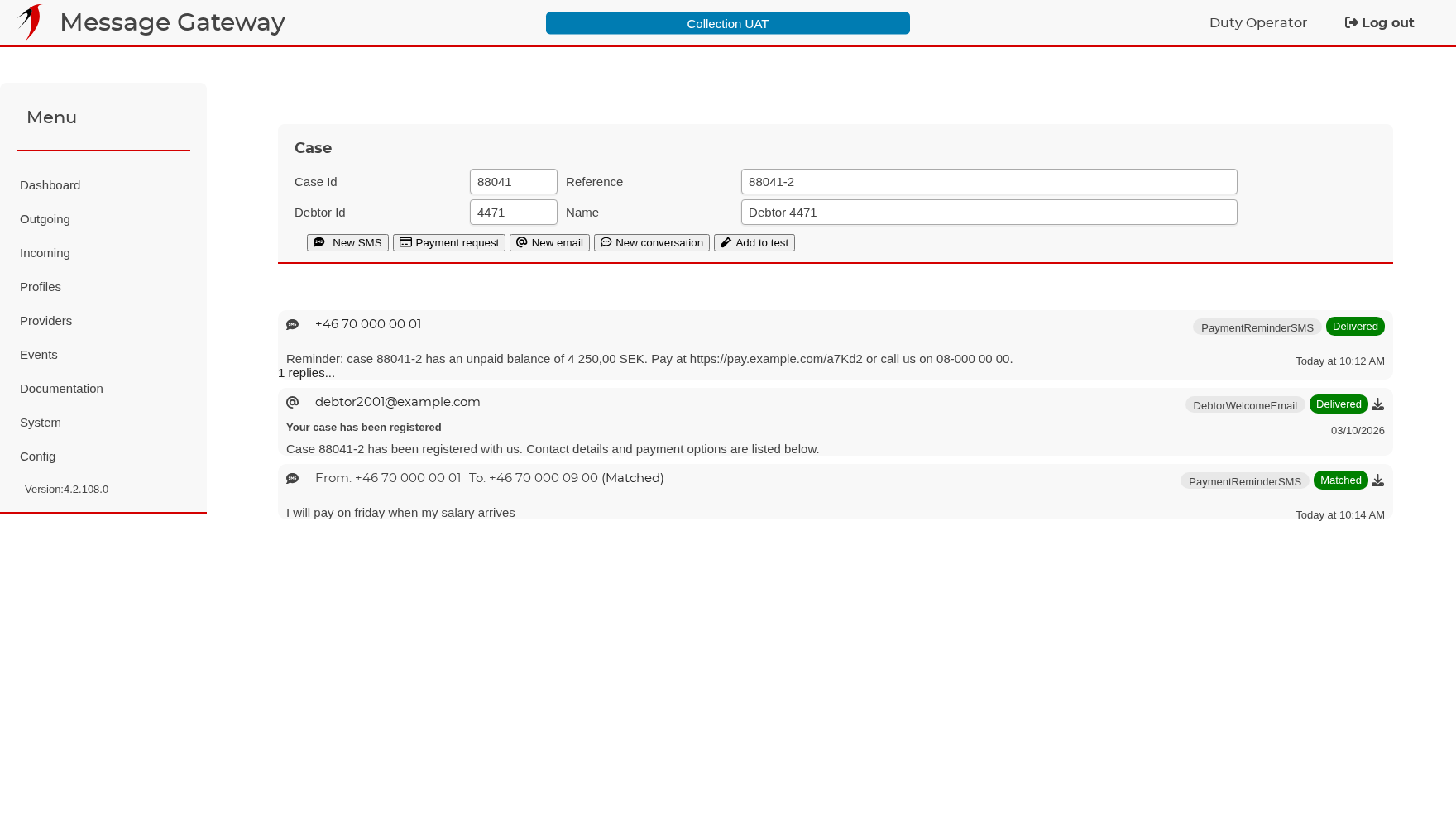
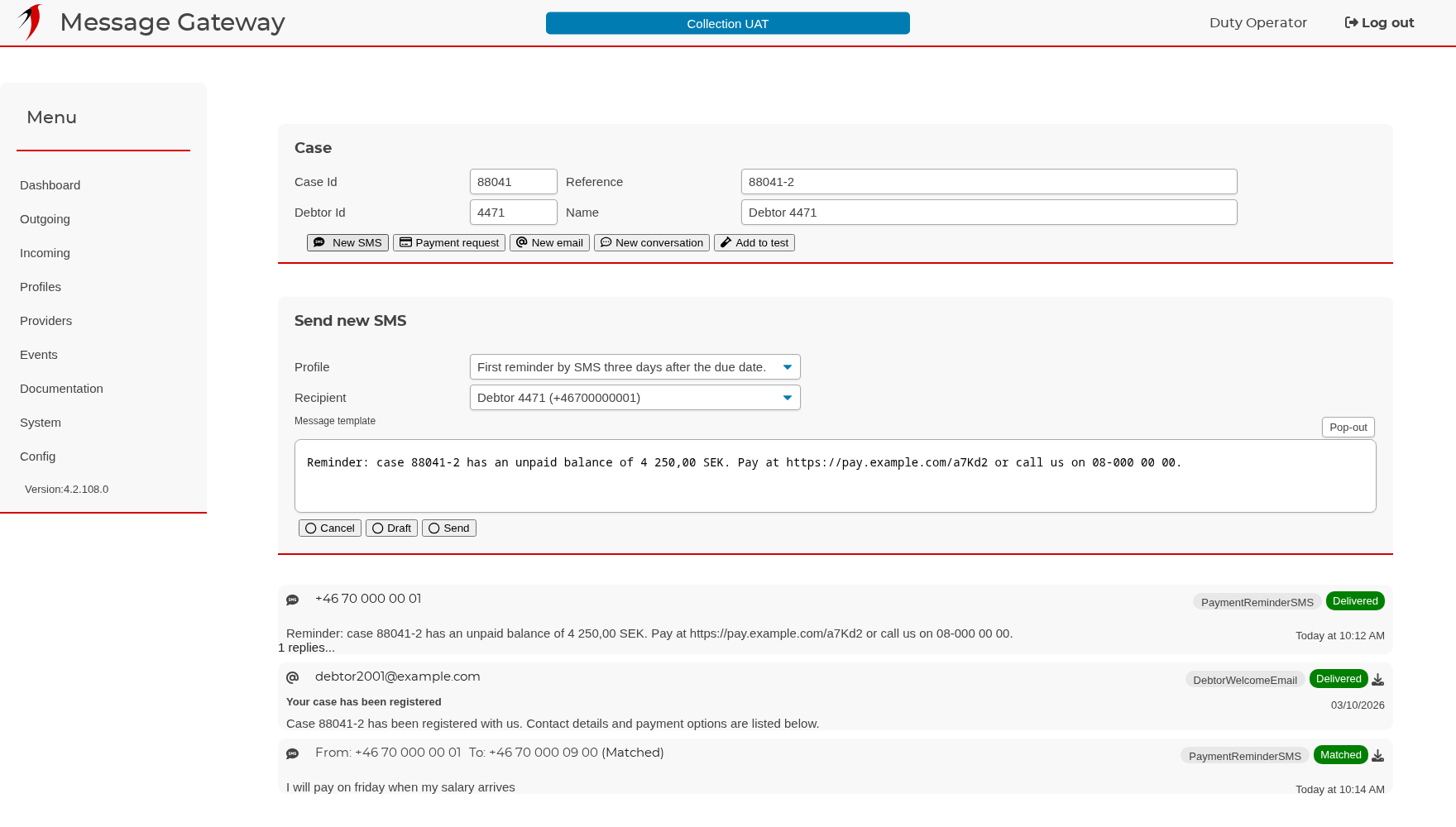
The whole correspondence, incoming and outgoing, in one thread.

Opening a case from any message gives everything sent to and received from it, newest first. The row of buttons starts a new SMS, email, payment request or conversation on this case without leaving the page.

Sending an SMS by hand

Sending an SMS by hand

The text you see is the text that will be sent.

The profile dropdown offers only the SMS profiles that apply to this kind of case, and choosing one renders its template against the real case data at once. The recipient list holds the numbers the gateway found for the case. Send queues the message; Draft stores it for someone else to approve first.

A message profile

A message profile

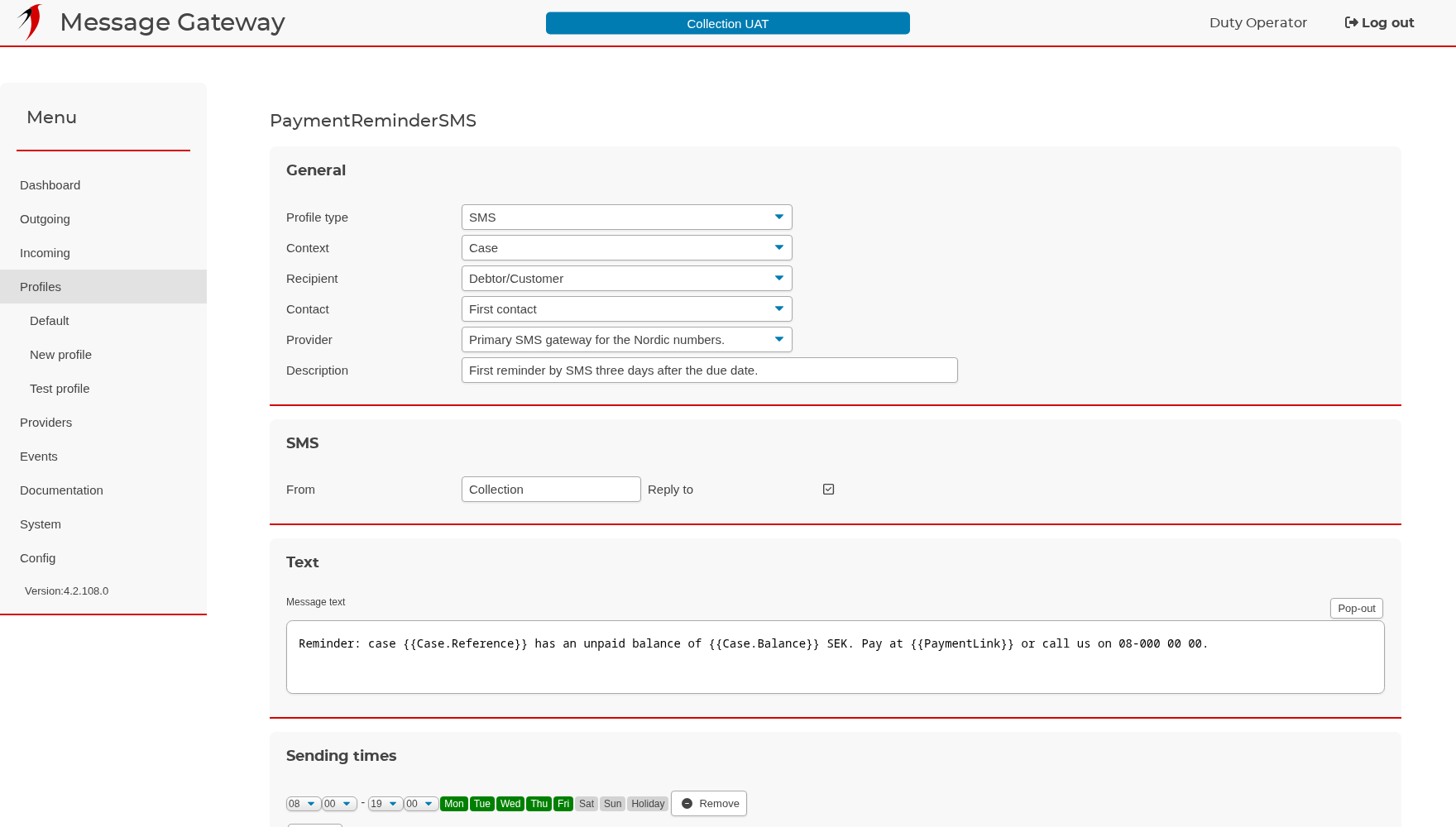
What it says, who it goes to, which provider sends it, and when it may leave.

The template is the text itself, with fields in double braces filled from the case when the message is generated. The sending window decides which days and hours the message may leave; anything generated outside it waits. Valid time is how long the gateway keeps trying, and the event handler is what runs when the provider reports back.

A provider

A provider

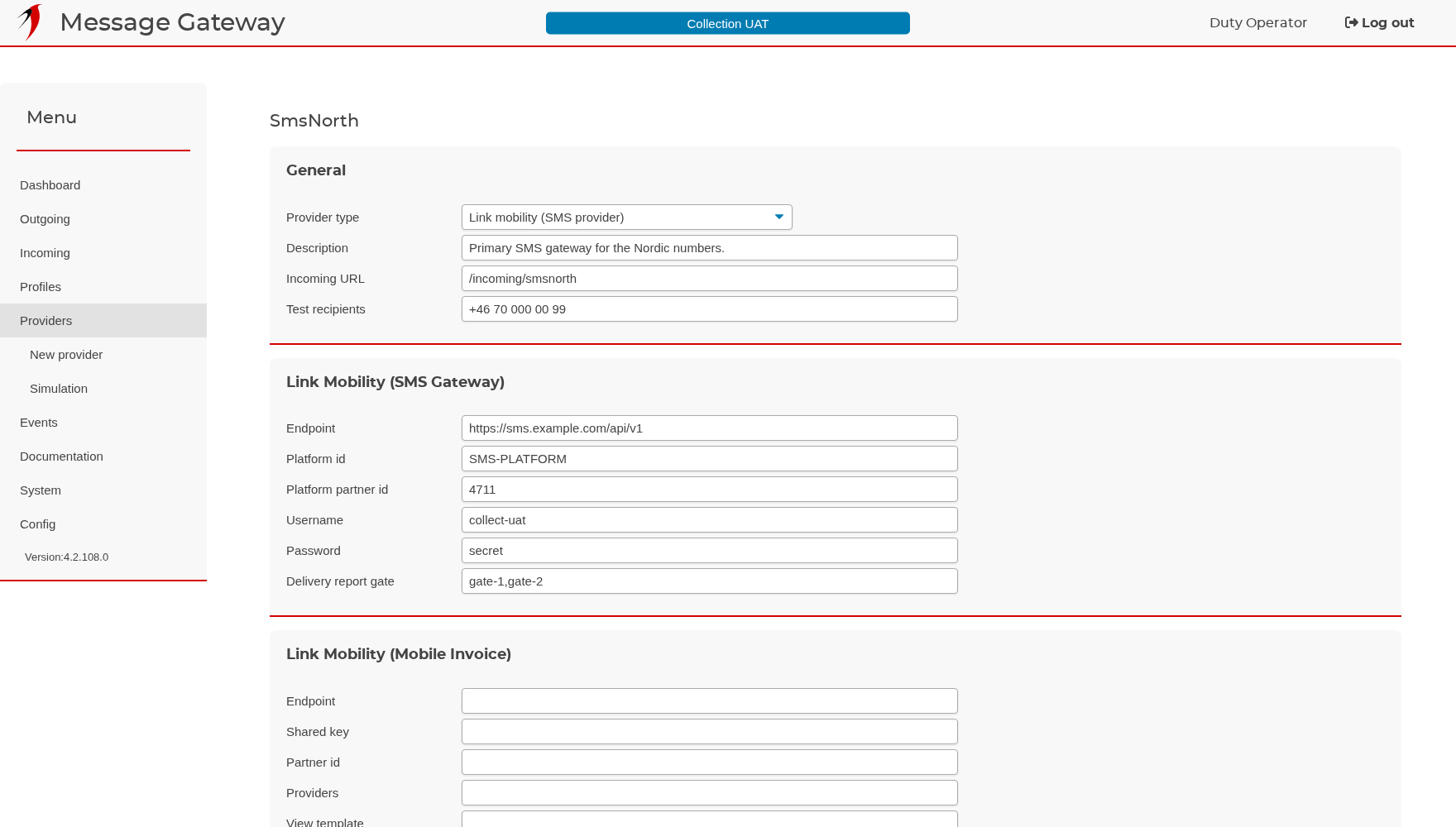
Test recipients are what make a test system safe.

A provider is the service that actually delivers: an SMS gateway, a mail relay, a payment service. Test recipients limit it to a few known addresses, so a test system can run against a copy of live data without reaching a single debtor. The incoming filter is the part of the callback address this provider answers on, so several providers share one public endpoint.

The simulator

The simulator

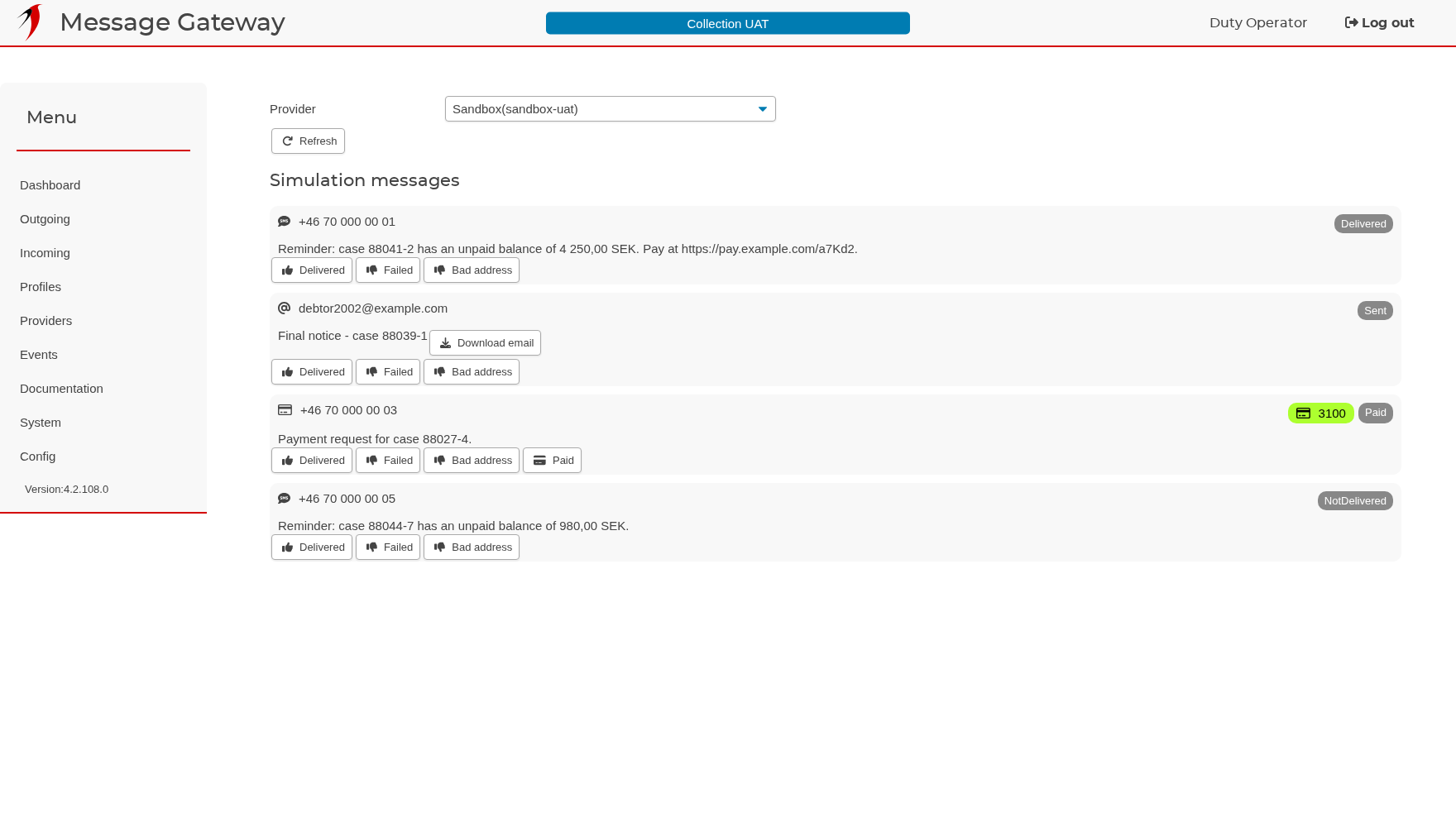
Play the provider: delivered, failed, bad address, paid.

A simulator provider keeps messages on the machine instead of sending them. The buttons under each one report it delivered, failed or paid, and the rest of the system reacts exactly as it would to a real provider — event handlers, status updates, history notes — so a whole flow can be tried end to end without anybody receiving anything.

An event handler

An event handler

Triggers decide when it runs; actions decide what it does.

A trigger fires on a delivery status, on a reply that matches a text, or on an action registered in the source system. The actions that follow write a history note on the case, send another message, run a query or call a web service. The same handler can be shared by many profiles.

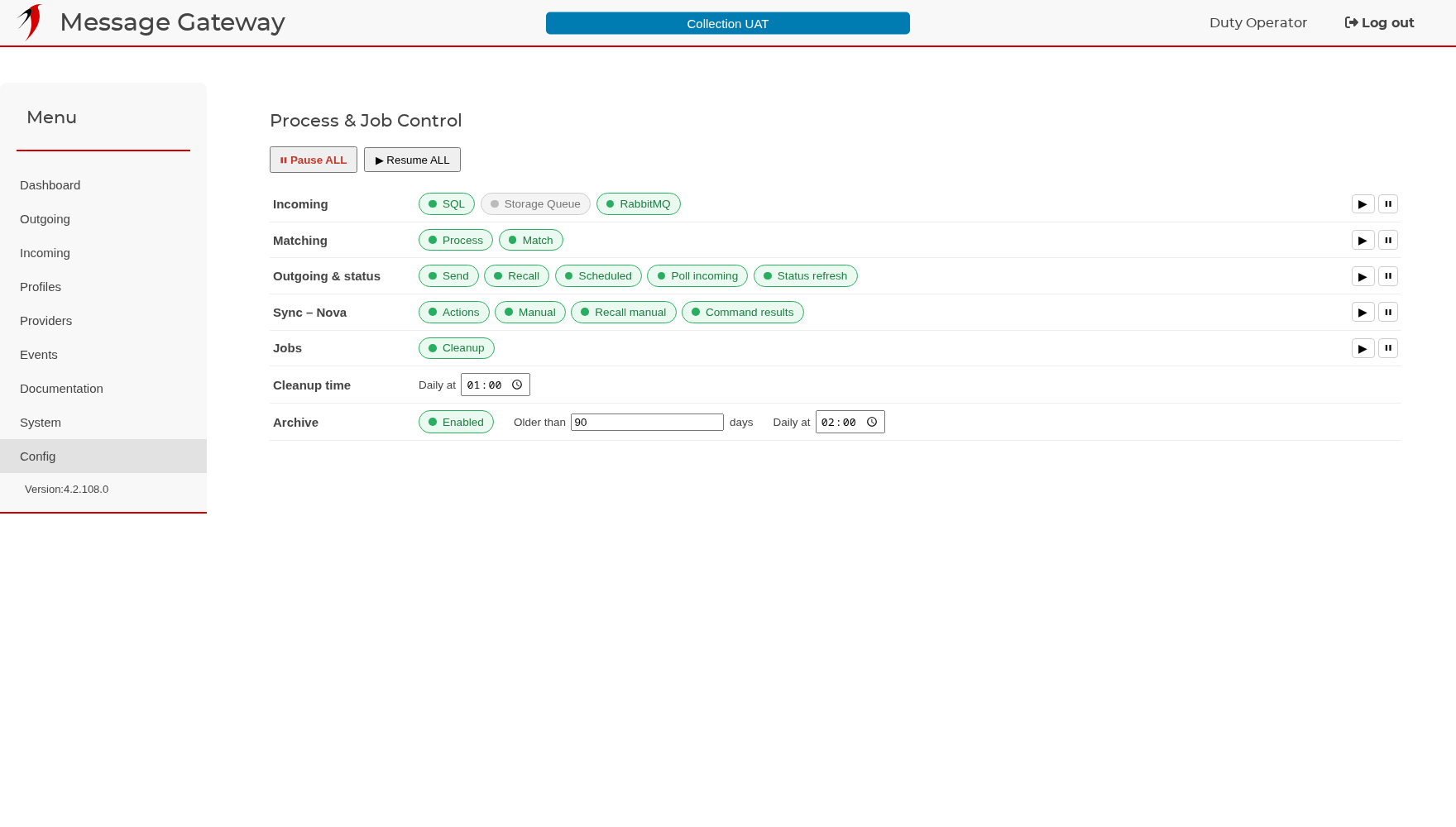
Process and job control

Process and job control

Pause one process during maintenance instead of stopping the service.

Each background process can be switched off on its own: receiving, matching, sending, recalling, status refresh and the synchronisation jobs towards the source system. Turn off sending, let the queue build, turn it back on — it takes effect within a second. The lower part sets when the nightly cleanup and archiving jobs run.

Get Message Gateway

Licensed per installation, supported directly by the person who wrote it.

Requirements

  • Windows Server 2016 or later, Linux, or Docker
  • .NET 10 runtime
  • SQL Server 2016 or later
  • Outbound TLS to the Svalefelt broker and HTTPS to your providers; no inbound ports