Free v1.1.15

SQL Deploy

A deployment script that contains only what actually changed — and that any SQL client can run.

Free to download. No registration, no email address.

SQL Deploy — A blank server

Compares first, and emits only the objects that differ

The script is plain T-SQL — no dependency on the tool to run it

One transaction, committed by a clearly marked final batch

Tables compared as a schema model; data-loss guarded by default

Reference data held as files, deployed as the rows that differ

Desktop application shows the plan and the diffs, then watches it run

SQL Deploy compares the stored procedures, functions, views, triggers, tables and reference data held as .sql files in your repository against a live SQL Server database, and writes a reviewable T-SQL script containing only the objects that differ. What to deploy is a YAML manifest; where it goes is an environment file. Command line for the pipeline, a desktop application for the person who wants to see the plan first.

Most deployment tooling for stored procedures re-applies every file on every run. That works, but it destroys information: every object's modify_date becomes the date of the last deployment rather than the date it last changed, so the database can no longer tell you when anything was really modified. It also makes the deployment log useless — a thousand identical lines say nothing about what the release contained.

SQL Deploy compares first, and emits only what differs.

What it does

  1. Reads the programmable objects from the target database, together with the ANSI_NULLS and QUOTED_IDENTIFIER settings each was created under.
  2. Reads the .sql files from the directories the manifest names.
  3. Compares them, ignoring differences that are not real: the form of the CREATE prefix, line endings, byte-order marks, surrounding whitespace, optional brackets. Two runs against an unchanged database produce identical output, byte for byte.
  4. Writes two artifacts: the deployment script, and a report of what it contains.

The script is plain T-SQL with GO batch separators. It runs under any standard SQL client, on a command line or in a query window — the tool is not needed to apply it, and it contains nothing that works in only one of them. That is deliberate: the artifact is the deliverable, so it can be reviewed in a merge request, attached to a change record, or handed to whoever owns the target database. Every step and every object announces itself as it runs, so progress reads the same under any client.

Nothing is ever dropped. Objects present in the database but absent from source are listed in the report and left alone.

The manifest says what, the environment says where

version: 1

createEnvironment:
  databases:
    - { name: AppDatabase, source: Databases/App }
    - { name: Reporting }

steps:
  - name: Tables
    type: tables
    source: [Databases/App/Tables]

  - name: Views and procedures
    types: [view, procedure]
    schemas: [Sales]
    source: [Databases/App/Views, Databases/App/Procedures]

  - name: Reference data
    type: data
    mode: seed
    source: [Databases/App/Data]

  - name: Reporting procedures
    type: procedures
    database: Reporting
    source: [Databases/Reporting/Procedures]

Each step declares what it is responsible for — an object type, the schemas, optionally its own database — and that declaration is validated: a procedure sitting in a folder called Functions fails the step instead of deploying quietly. The same manifest serves every environment, because the target lives in a file beside it — deploy.uat.yaml, deploy.prod.yaml — with the server and password left as ${NAME} so the file holds no secret.

sqldeploy script --manifest deploy.yaml --environment uat --source-ref $(git rev-parse --short HEAD)
sqldeploy deploy --manifest deploy.yaml --environment uat
sqldeploy exec   --input out/deploy.sql --server SQL01 --database AppDatabase

script writes the script and the report and stops. deploy writes them and then runs the script — writing the artifacts before it connects, so what ran is on disk even when the run fails. exec runs a script that already exists. --validate-only compares and validates every step without emitting anything, which is the check to put on a pull request.

Tables and data, in the same script

Programmable objects are safe to compare as text. Tables are not: the same column added twice is not the same as adding it once, so tables are compared through a schema model and the resulting ALTER statements go into the same script. That step is the only one that can be destructive, and it is marked as such wherever it appears: a change that would drop a column stops the script before it gets there unless data loss is explicitly allowed, and the exit code says review this either way.

Reference data is held as files too. A data step lists, per table, the rows it would insert, update or delete — as a seed into a table the same run creates, or as a merge into one that already exists.

A window on the plan

The desktop application puts the same engine behind a window: pick a manifest and an environment, and the plan appears as a tree of steps and objects with a side-by-side diff of each change. Untick an object to leave it out of the script. Read the script that will run. Deploy it and watch the objects tick off as the server reaches them, then see the plan compared again — what still differs is what is still to do. An environment file decides what the application may do there: a production environment can be compared and its script copied for the release process, but never deployed by clicking.

A blank server is one press away from a deployed one: the application creates the databases the manifest declares, compares the sources against what it has just built, and deploys that.

SQL Deploy is free to use and open source.

SQL Deploy in pictures

11 screens, and what each one does.

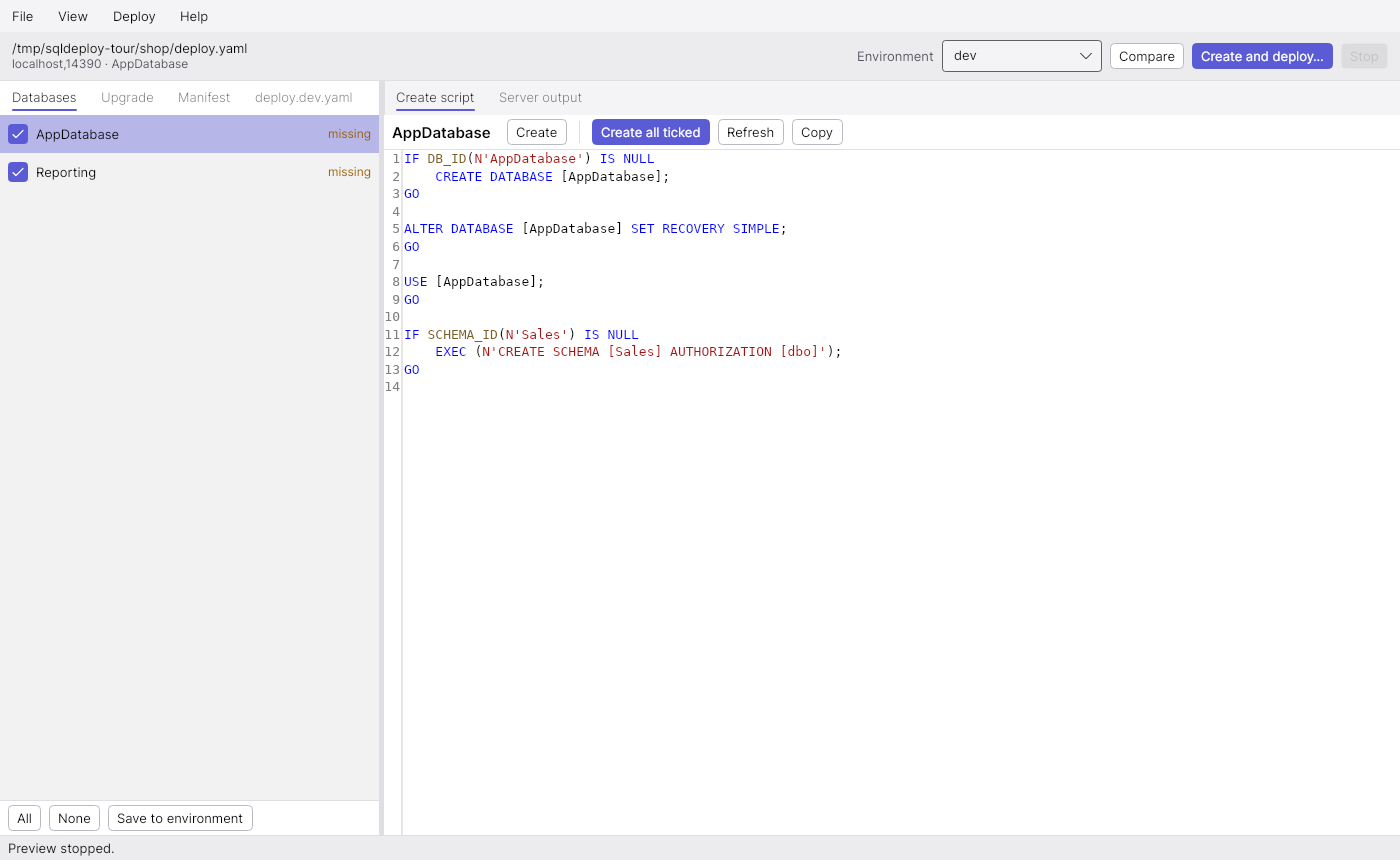
A blank server

A blank server

The manifest opened against a server that has none of its databases yet.

Opening deploy.yaml lists the databases its createEnvironment section declares and asks the server which of them exist. Here the answer is none, so the application opens on the Databases tab: creating them is the only thing there is to do. Both are ticked because the development environment file says defaultDatabases: [AppDatabase, Reporting].

Selecting a database shows how it will be created. AppDatabase has a create script of its own, which sets its options and makes the Sales schema; Reporting has none and is created with a plain CREATE DATABASE. The toolbar's button already reads Create and deploy….

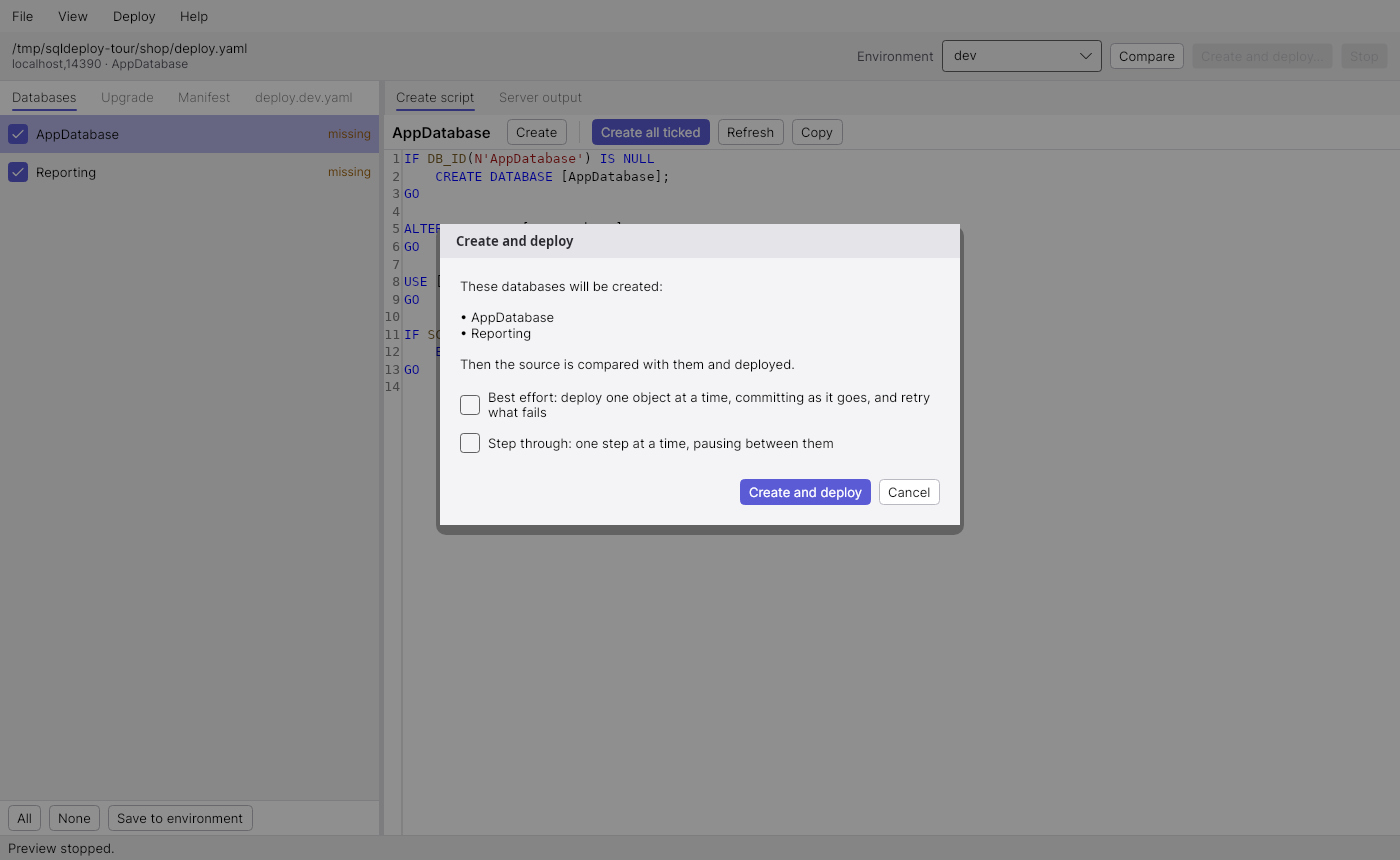
Create and deploy

Create and deploy

One press takes a blank server to a deployed one, and says first what it is about to do.

Create and deploy… asks before it does anything, naming the databases it will create. There is no plan to list yet, since there is nothing to compare against; it says instead that the sources are compared once the databases exist. How the deployment runs is decided here, for this deployment only: Best effort and Step through both start off.

Confirming creates the databases, compares the sources against what it has just built — a plan made before they existed described a server that is gone — and deploys that. The reference data step is mode: seed, so its rows go into a table the same run creates.

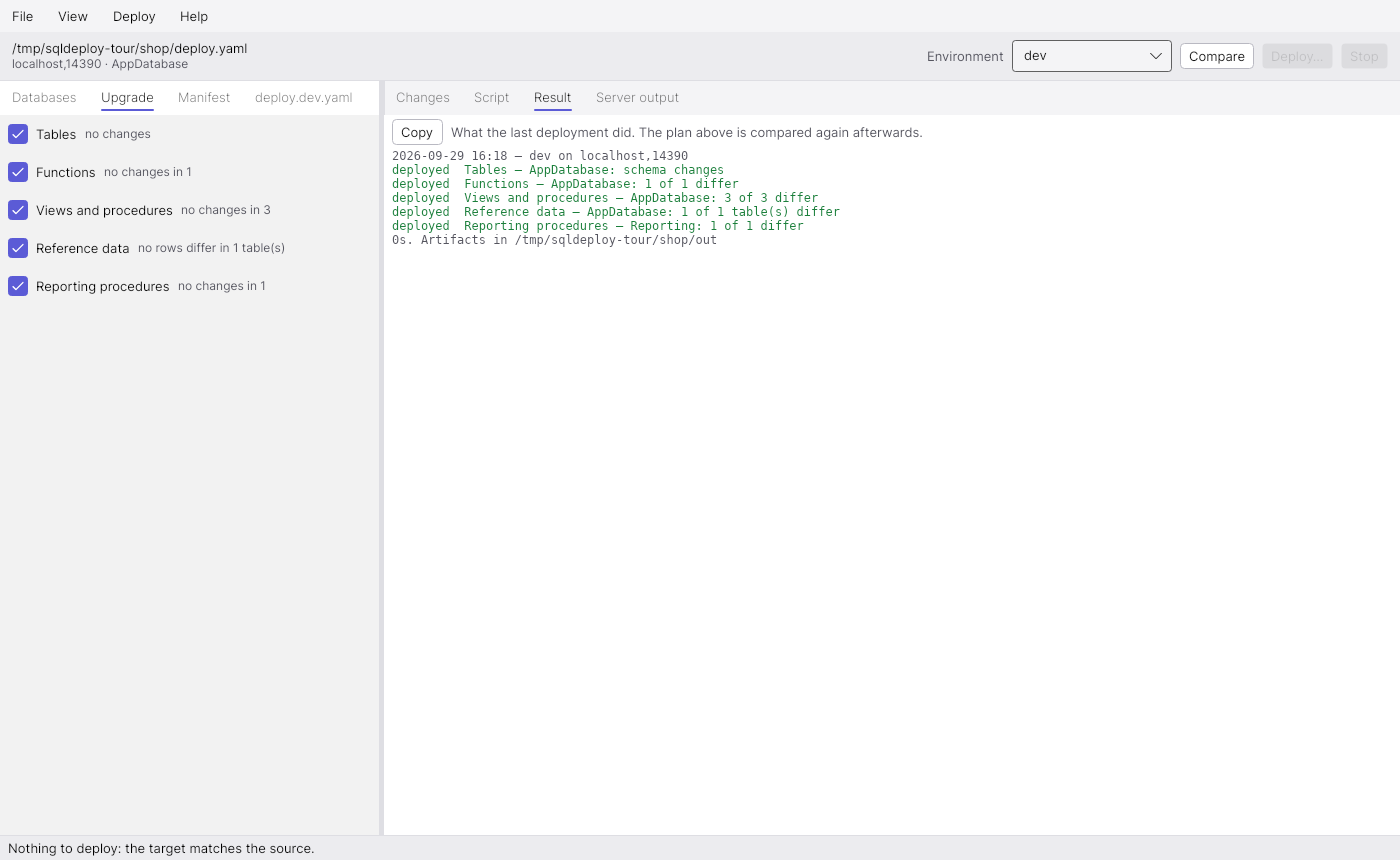
Deployed

Deployed

What the deployment did, and a fresh comparison that finds nothing left to do.

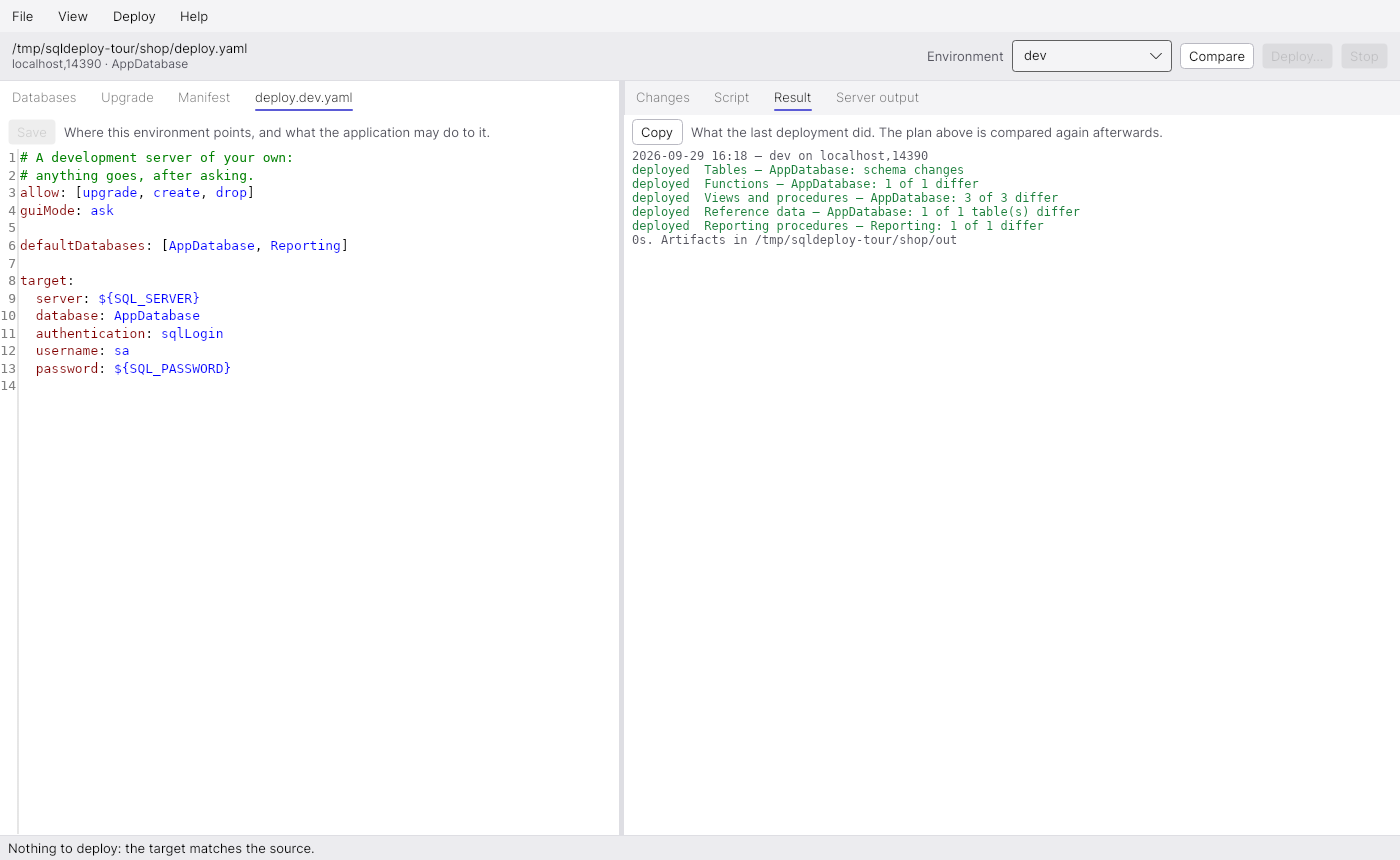
The Result page says what was deployed, to which database, and where the script and the report were written before anything ran. The script is the deliverable: the same file could have been handed to any other SQL client.

After deploying, the plan is compared again, and that is the honest answer to whether it worked. Every step on the left now reads as up to date.

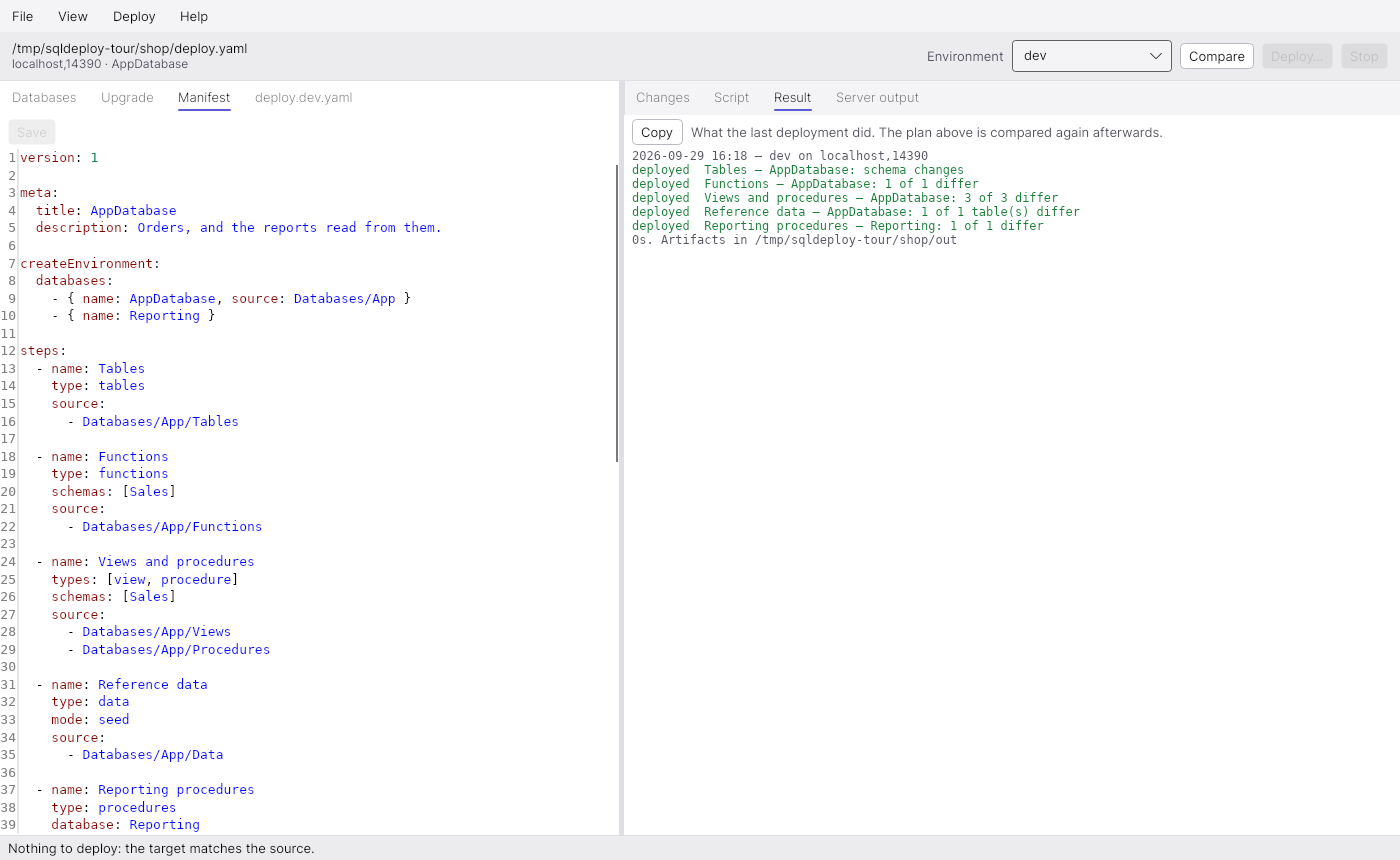
The manifest

The manifest

What a deployment consists of: the databases, and the steps that fill them, in order.

The manifest is the whole truth about what is deployed, and it names no server. Each step owns one kind of thing — tables, functions, views and procedures, reference data — in one database, read from the folders it lists. The Manifest tab edits the file itself, so comments and layout survive, and saving it compares again.

An environment

An environment

Where it goes, and what the application may do there, kept in a file beside the manifest.

deploy.dev.yaml beside deploy.yaml is the environment called dev in the drop-down. It says where to deploy, with the server and password left as ${NAME} so the file holds no secret, and what the application may do there: allow: [upgrade, create, drop].

deploy.prod.yaml is listed too, with guiMode: disabled — production is compared from here and its script handed to the release process, never deployed by clicking.

An upgrade

An upgrade

The next release of the sources, compared with the database it would change.

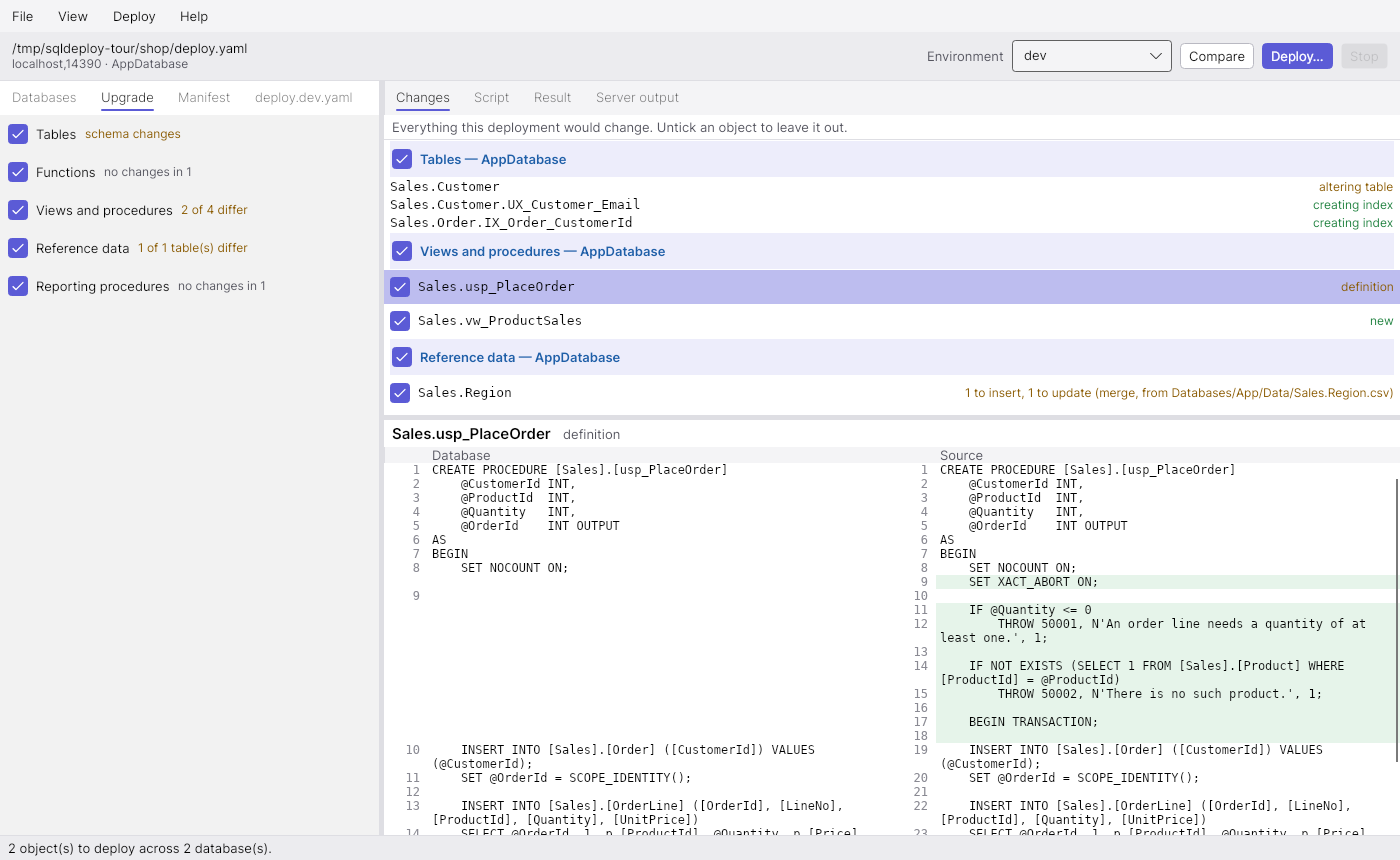
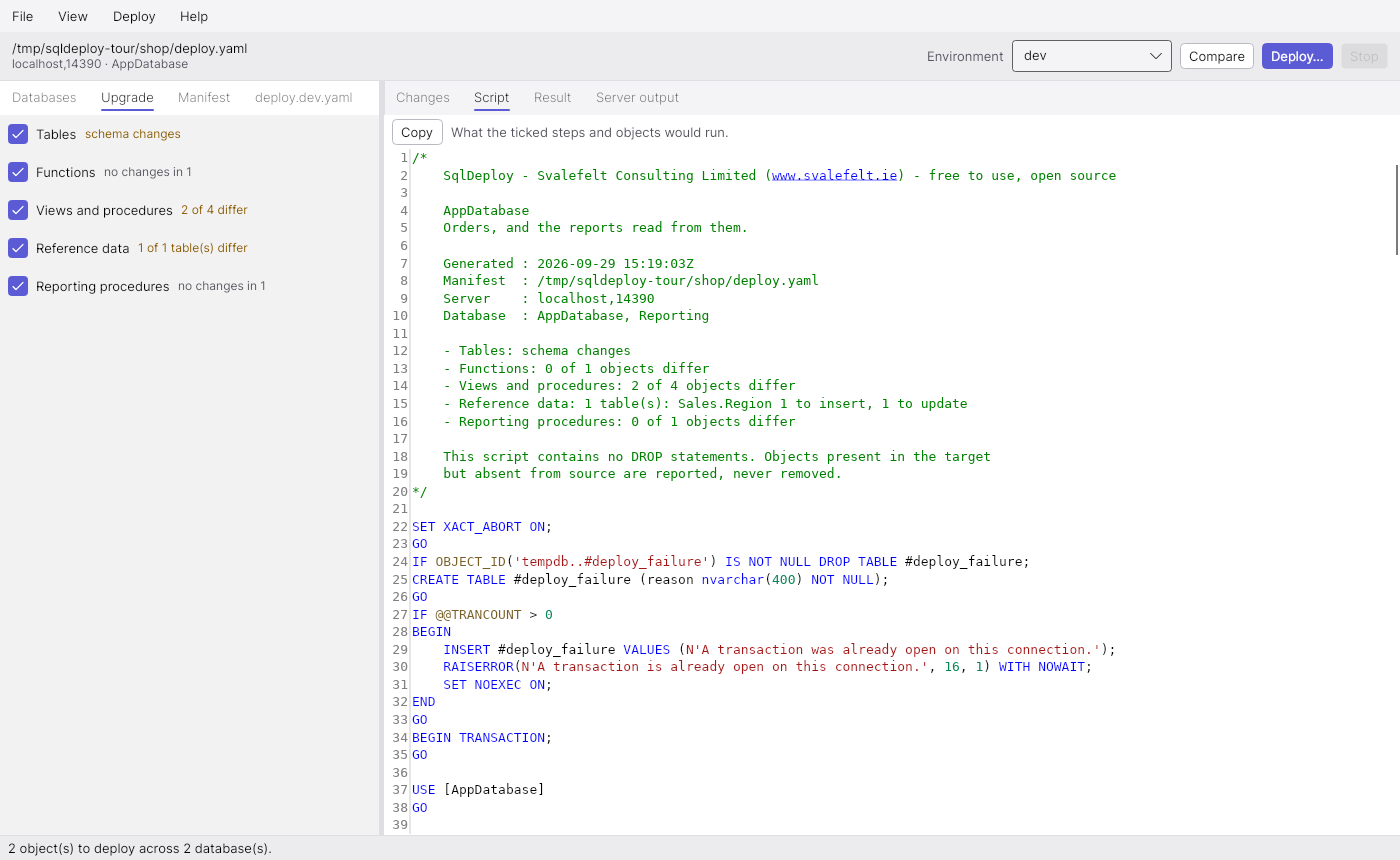
The second release adds a column and two indexes, tightens a procedure, adds a view and corrects the reference data. Comparing it lists every object that differs, grouped by step, with the diff of the selected one underneath.

The diff is of the two texts after the normalisation the comparison applies, so every highlighted line is a difference that counted. Each object has its own tick: unticking one leaves it out of the script, and the script says so in its header.

A table change

A table change

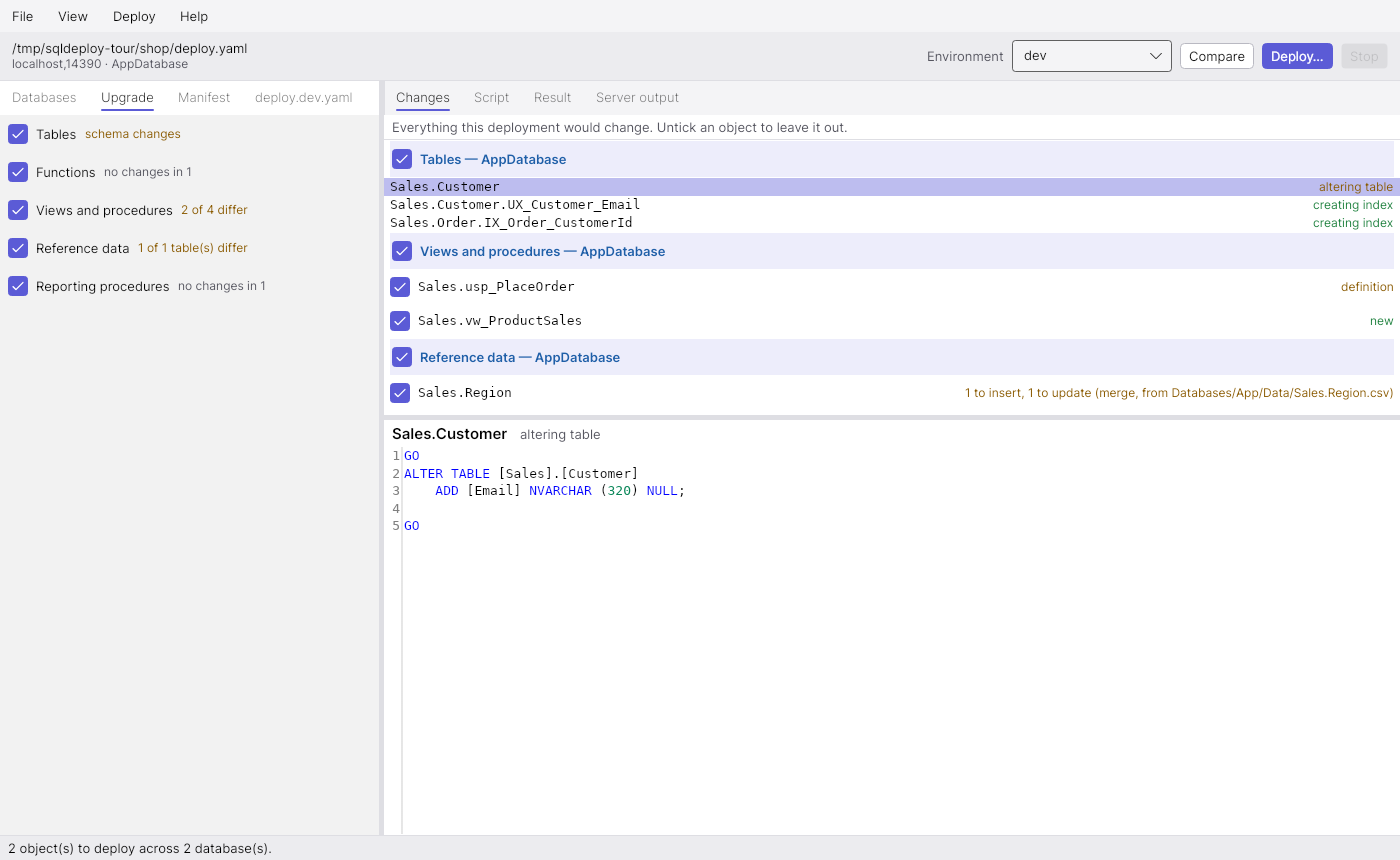
Tables are compared as models, and listed as what the script will do to them.

A tables step has no text diff: its comparison is between models of the schema, and what comes out is a script. Each table, index or constraint it touches is listed with the part of the script that does it. Anything that could lose data is marked, and without allowDataLoss the script stops itself before it gets there.

A data change

A data change

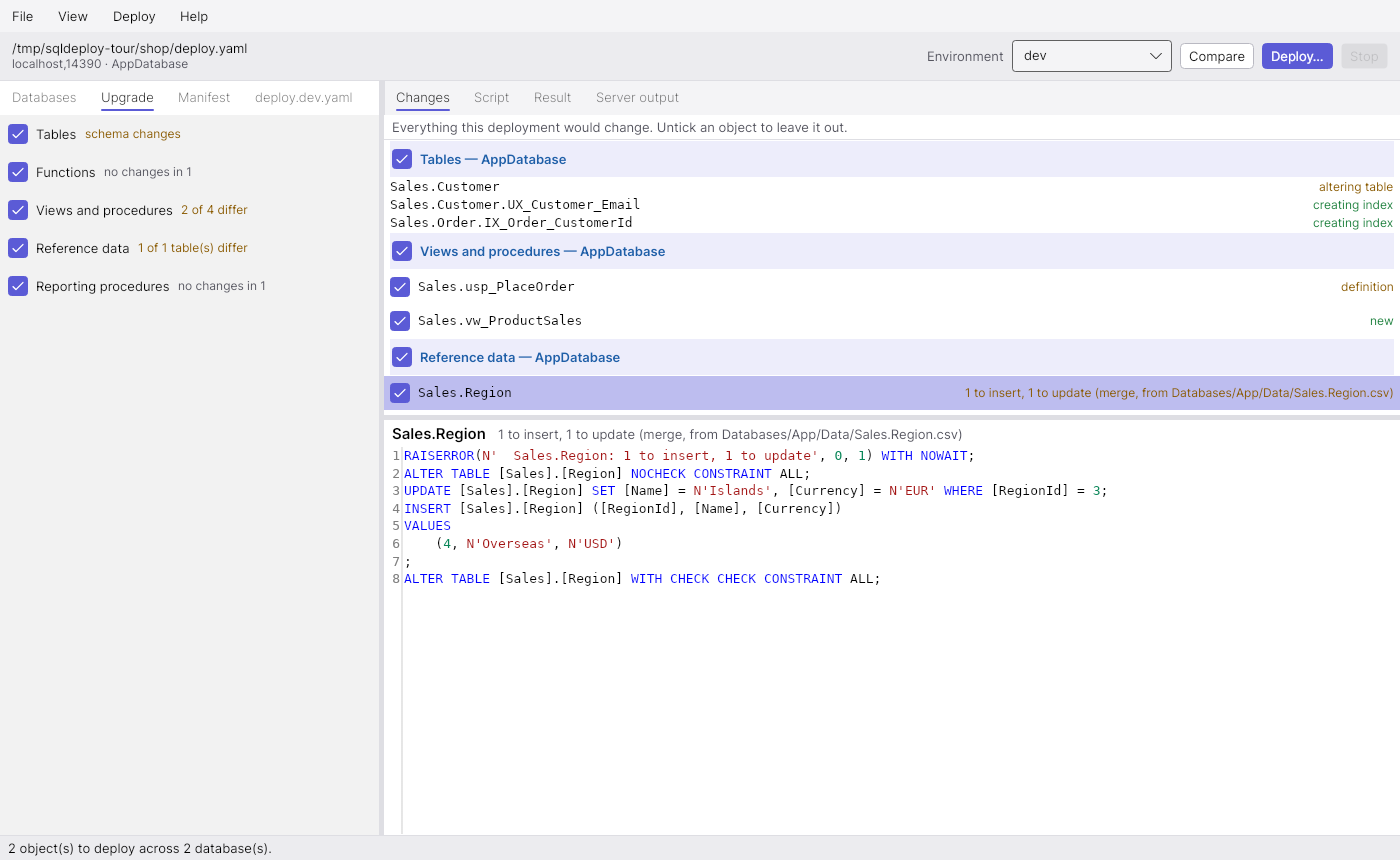
Rows held as files, deployed as the rows that differ.

With the table in place the reference data step has moved from seed to merge: rows missing from the table are inserted and rows that differ are updated. Selecting the table shows the statements that do it — here one region added and one corrected.

The script

The script

Everything the upgrade does, as one script any SQL client could run.

The Script page is what deploying runs, and what is written to disk first. It is one transaction, announces each step and object as it goes so progress reads the same under any client, and has no dependency on this tool. Copy takes it for somebody else to run.

Deploy

Deploy

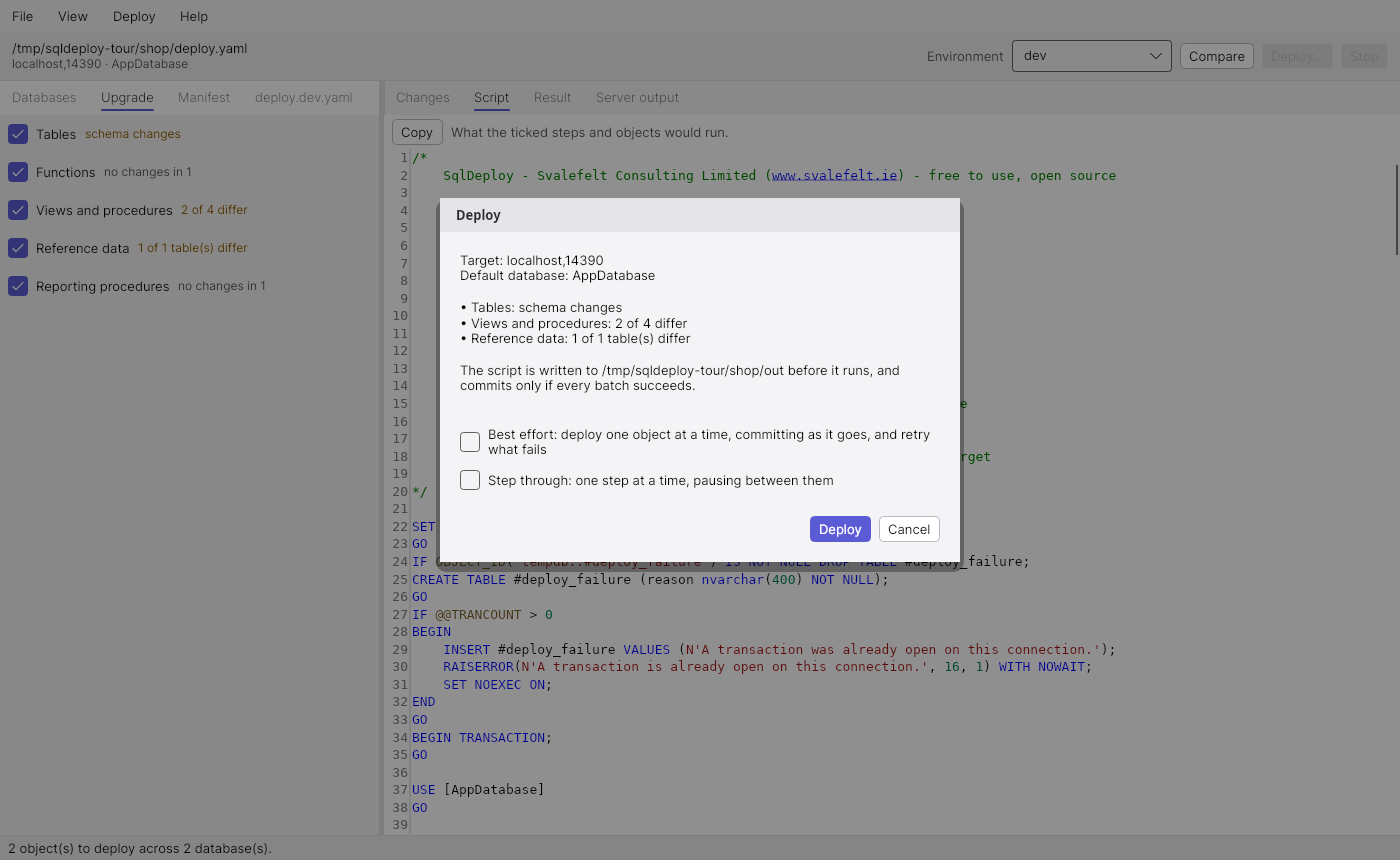
The upgrade is confirmed with the list of what will run.

Deploy… deploys the plan on screen, not a fresh one: what was reviewed is what runs. The confirmation names the target, lists every step with work to do and anything that can lose data, and says where the script is written before it runs.

Server output

Server output

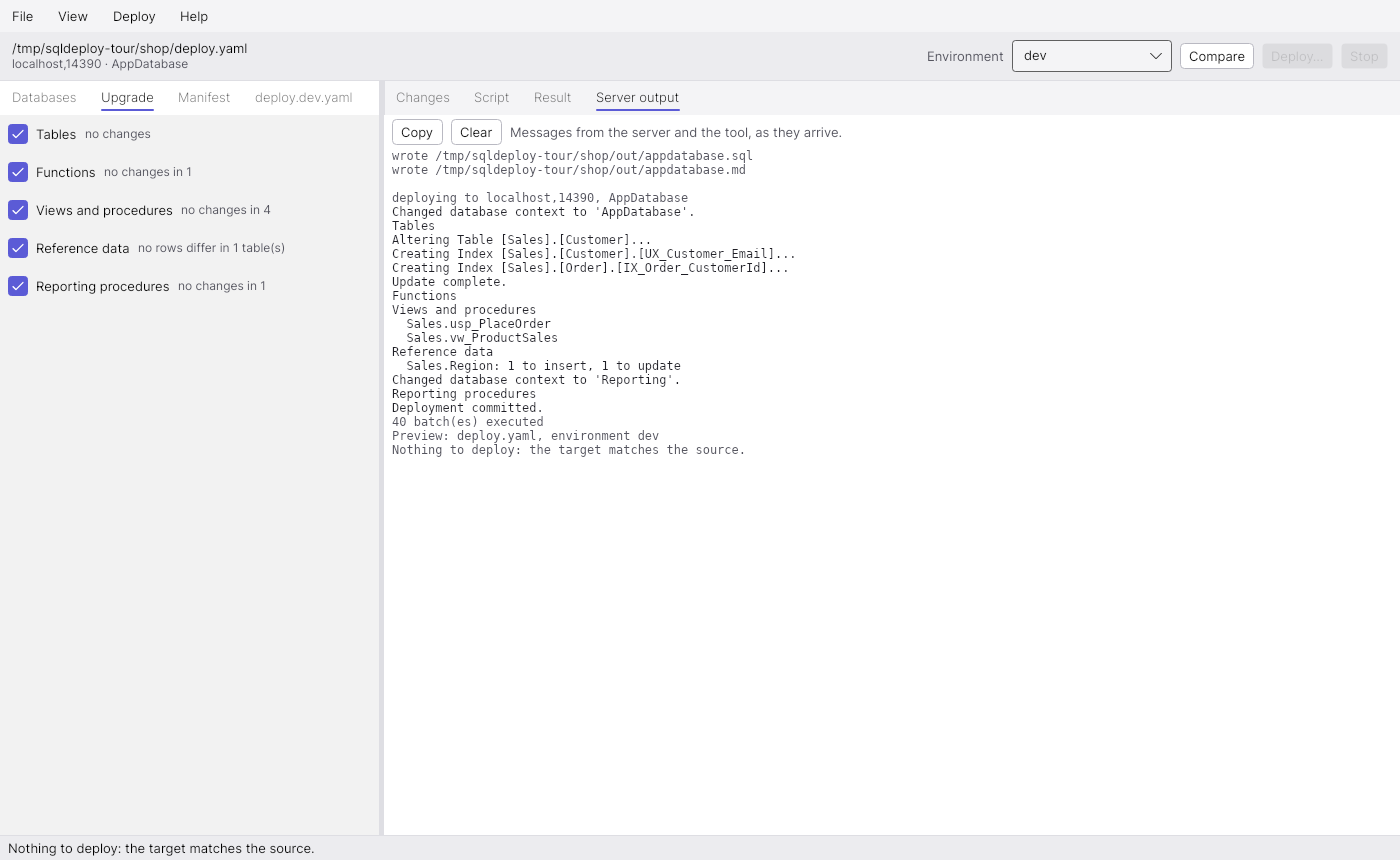
Progress comes from the script itself, as the server sends it.

Server output shows every message as it arrives: the script announces each step and each object with RAISERROR … WITH NOWAIT, and the schema changes report themselves as they are made. When it is done, the plan is compared again, and is empty.

Get SQL Deploy

Free to download and use. No registration, no email address.

Requirements

  • Windows or Linux
  • .NET 10 runtime
  • SQL Server, with integrated or SQL login authentication